AI Receptionist
An AI receptionist that answers every call and every website visitor
When you are with a customer, on a job or closed for the day, it answers your phone and your website chat, takes the message or booking request and sends it to you. You approve it before it goes live.
Never miss a customer · free text demo built from your public pages · nothing is sent to anyone
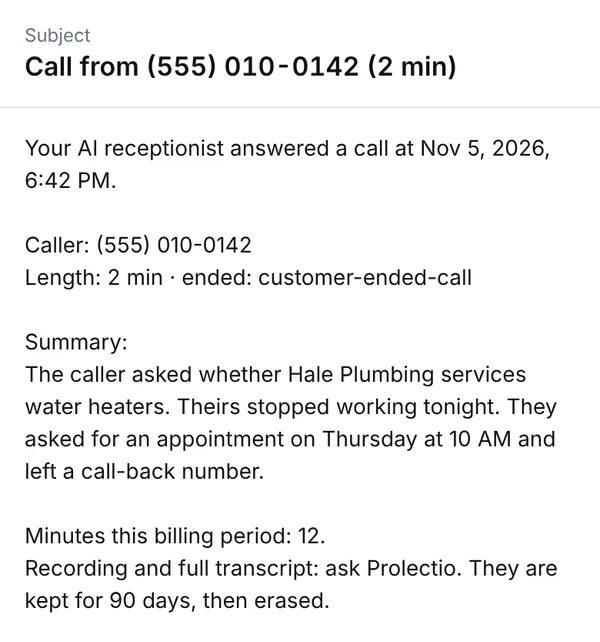
“Hi, do you service water heaters? Mine stopped working tonight.”
- Caller
- [Caller name]
- Reason
- Water heater not working
- Call back
- [Phone number]
Appointment requested Thu 10 AM
Approved by you
Hear it live
(312) 376-3136Our AI receptionist answers, takes call-back and appointment requests and, during business hours, can put you through to the founder.
Who is it for?
Any business that takes calls it cannot always answer. These are the ones with their own page.
Dental offices
The front desk is with a patient when the phone rings.
Med spas
Hands are with a client.
Hair salons
Hands are with a client.
Law firms
Intake calls arrive in meetings and busy weeks.
Accounting firms
Intake calls arrive in meetings and busy weeks.
Home services
You are on site with your hands full.
Auto shops
You are under a car.
Real estate teams
You are at a showing.
Where do customers slip away?
In three places: the call you miss, the form nobody answers and the quote nobody follows up.
The call that goes to voicemail
You are with a customer or it is after hours. The caller does not leave a message and tries the next business on the list.
The web form nobody answered
An enquiry arrives on a busy afternoon and waits until tomorrow. By then the person has asked someone else.
The quote that went quiet
You sent a price and heard nothing back. Following up is on your list, below everything that is on fire.
These are examples, not statistics.
How does a call go?
The receptionist answers in your business name, says it is an AI, takes the request and sends you a summary.
- Receptionist
Hale Plumbing. I'm an AI assistant. How can I help?
- Caller
Hi, do you service water heaters? Mine stopped working tonight.
- Receptionist
Yes, the team does. I'm sorry about that. Is there any water leaking, or anything that smells like gas?
- Caller
No leak, it's just cold.
- Receptionist
Thank you. What is your name, the address and the best number to reach you?
- Caller
[Caller name], [address], [phone number]. Can someone come Thursday morning?
- Receptionist
I've sent that to the team as an appointment request for Thursday at 10 AM. They will call you at [phone number] to confirm.
Example call. The business and the details are made up. The receptionist says it is an AI, takes the request and sends you the summary.
Today
Calls
Hale Plumbing
- (555) 010-01426:42 PM
Water heater not working. Appointment requested Thu 10 AM.
Approved by you - (555) 010-01774:15 PM
Asked what a drain cleaning costs. Wants a call back tomorrow.
- (555) 010-01191:30 PM
Dripping kitchen tap, not urgent. Appointment requested Friday 9 AM.
- (555) 010-016311:05 AM
Asked about the service area. Message left for the owner.
- (555) 010-01089:20 AM
Outdoor tap frozen. Request sent to the team.
And on your website
The same receptionist answers your website visitors while you work, from your own pages and documents.
On the phone
- Answers every call, 24/7, in your business name
- Takes messages and booking requests and sends them to you right away
On your website
- Answers visitors' questions from your own website and documents
- Captures leads and booking requests while you work
- Passes the visitor to you when it does not know
Which plan fits me?
Essentials
Monthly plan$99/moBest if you are happy to book from a message and call people back.
- Minutes included
- 200 a month
- After that
- $0.25 a minute
- Setup fee
- None
- An AI receptionist answers every call, 24/7, in your business name
- Takes messages and booking requests and sends them to you right away
- Answers website visitors from your own pages and documents, captures leads and booking requests
Pro
Monthly plan$199/moBest if you want jobs booked on the call and quiet leads followed up.
- Minutes included
- 500 a month
- After that
- $0.25 a minute
- Setup fee
- None
- Everything in Essentials
- Books appointments straight into your Google Calendar, and moves or cancels them when your customers call back
- Drafts follow-up emails to missed callers and chat visitors who leave an email, for your approval, and asks customers for a review by email after a job you mark done or a calendar appointment
- 200 / 500 minutes included, then $0.25 a minute; we never hang up on a caller.
What happens next?
You order
Choose Essentials or Pro and see the total before you pay. No setup fee. You can try the free demo first.
At checkout
We build it and send it to you
We build your receptionist from the information you give us and send it to you.
Within 1–2 business days
You review and approve
Look it over. Ask for changes, or approve it.
When you are ready
It goes live
It goes live after you approve it. Nothing changes on your phone line until then, and you can pause or undo anything.
After you approve
Approved by you
Ready for you to review within 1–2 business days.
Nothing changes on your website, phone line or store until you approve it. You can pause or undo anything.
Straight answers
- It answers from the information you give it. When it cannot help, it takes a message for you.
- On your website, the chat answers from your website and the documents you give it. When it does not know, it says so and passes the visitor to you.
- Never miss a customer is the goal, not a guarantee. We cannot promise a number of calls, bookings or sales, or that visitors will book.
- Calls go to an AI that says so. Recording is a setting we agree with you, and when it is on, callers are told.
- Texting is not available yet. It is coming soon as a separate, optional add-on, and only for customers who agreed to receive texts.
- The free demo shows the receptionist only.
Try the receptionist on your own website
Enter your website and, within minutes, you can chat with a text demo built from its public pages. Ask it what one of your customers would; it is a demo, so nothing is sent to anyone.
What do missed calls cost you?
Enter your own figures to see what missed calls may cost you each month. Nothing you type here is sent or saved.
How this is calculated
- Calls missed a month = calls you get x share that go unanswered.
- Jobs those calls could have become = calls missed x share of answered calls that turn into a job.
- Revenue at risk a month = jobs x average value of a job.
- Revenue at risk a year = revenue at risk a month x 12.
- Break-even = the Essentials monthly price divided by your average job value, rounded up to one decimal.
Every figure is one you entered. No outside average or benchmark is used, and the calculator runs in your browser only.
See where you stand first
Run the free audit on your website. It takes under a minute and needs no account.
Questions people ask before they order
Does "never miss a customer" mean no call is ever missed?
No. It is the goal, not a promise. Your receptionist answers every call it receives, even after your included minutes are used, and it works from the information you give it. When it cannot help, it takes a message for you.
What kinds of business is this for?
Any business that takes calls, bookings or enquiries and cannot always answer them in the moment. The receptionist is trained on your own services, prices, hours and policies, so it fits how you work rather than a template.
What happens when I use my included minutes?
200 / 500 minutes included, then $0.25 a minute; we never hang up on a caller. Extra minutes are billed monthly, after the month ends. You can also add minutes ahead of time with the voice add-ons.
Should I choose Essentials or Pro?
Choose Essentials if you are happy to book from a message and call people back, and Pro if you want jobs booked on the call. Essentials ($99/mo) answers every call and sends you the message or booking request. Pro ($199/mo) adds booking straight into your calendar, follow-up with missed leads, and review requests, and includes 500 minutes instead of 200.
What does the website chat answer from?
Your own website and the documents you give it. When it does not know something, it says so and passes the visitor to you. It also captures leads and booking requests while you work.
Is the website chat included in both plans?
Yes. Essentials and Pro both include the receptionist on your phone and the chat on your website. Pro adds calendar booking, follow-up with missed leads, and review requests.
Do you text my customers?
Not today: nothing is texted. Texting is coming soon as an optional add-on, and even then only to customers who agreed to receive texts.
Are calls recorded?
The receptionist tells every caller it is an AI. Recording is a setting we agree with you, and whenever it is on, callers hear that the call may be recorded.
How does it work?
1. You order. 2. We build it and send it to you. 3. You review and approve. 4. It goes live. Ready for you to review within 1–2 business days.
Are there setup fees or contracts?
No setup fees and no minimum term. Plans bill monthly, or yearly with 2 months free. Billing starts on the date you order. Month to month. Cancel any time and get the unused part of what you paid back. You can change or cancel a plan from your billing portal; the details are in the terms.
Do I need a new website?
No. It works with your current phone number and website.
Last updated