Office Autopilot
Get paid without chasing.
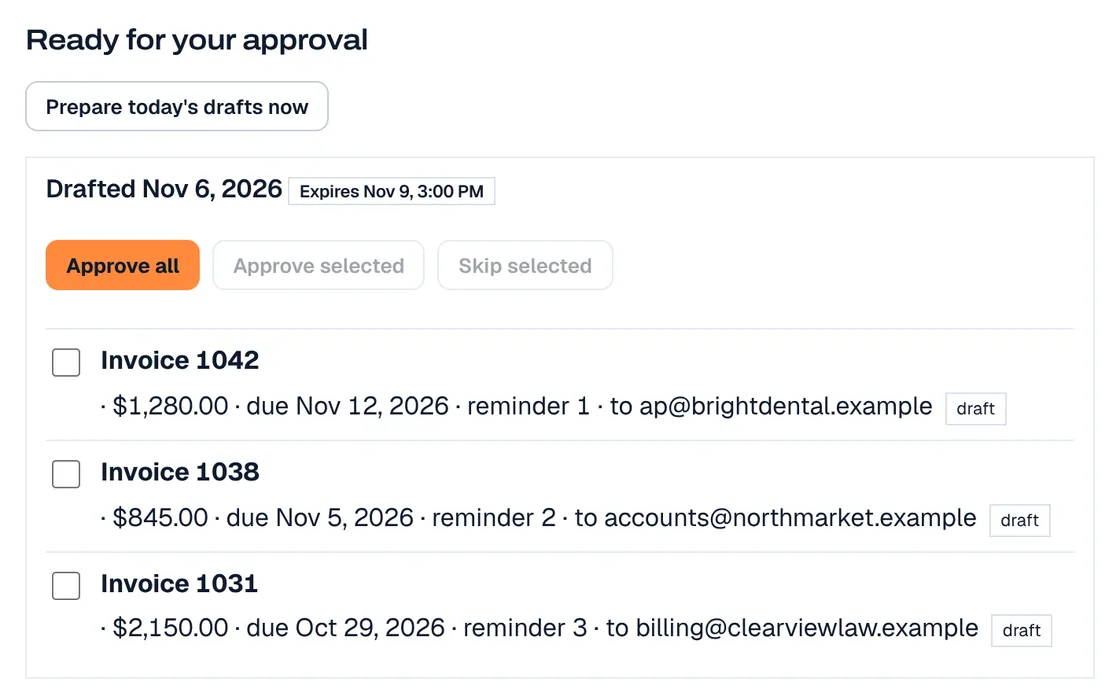
Office Autopilot drafts your invoice reminders and your quote and invoice follow-ups, and reads your invoices and receipts into your Google Sheet. You approve how they work before they go live.
No setup fee · month to month · you approve it before it goes live
- To
- [Customer]
- About
- Invoice #1042 · $640 · due 12 days ago
Hi [Customer], a quick reminder that invoice #1042 for $640 was due 12 days ago. If it is already on its way, thank you. If you have a question about it, just reply to this email. Hale Plumbing
Sent only after you approve it
Three steps after you order
We build it and send it to you
We set it up for you. Ready for you to review within 1–2 business days.
You review and approve
Look it over and ask for changes. Reminders and follow-ups go out only after you approve how they work.
It goes live
Office Autopilot starts on your invoices and quotes the way you approved.
Who is it for?
An owner who loses track of unpaid invoices
Office Autopilot drafts invoice reminders and sends them only after you approve how they work.
A business that sends quotes and then waits
Office Autopilot drafts the quote and invoice follow-ups for you, and sends them only after you approve how they work.
What does it do?
Office Autopilot works on your invoices and quotes, and document intake is included. There are no monthly limits on reminders and follow-ups.
Invoice reminders
- Invoice reminders that get you paid without chasing
- Unlimited reminders and follow-ups, no monthly cap
Quote and invoice follow-ups
- Quote and invoice follow-ups, drafted for you
- Sent only after you approve how they work
Document intake
- Document intake included: invoices and receipts read from email or upload and logged to your Google Sheet
- Nothing is added to your Sheet until you approve it
What does it cost?
Office Autopilot
Monthly plan$49/moBest if you spend time chasing invoices and quotes.
- Billing
- Month to month
- Setup fee
- None
- An extra workflow for Office Autopilot is $49/mo each, up to 5. Document intake is already included. For each extra workflow, choose appointment reminders or thank-you and welcome emails. Nothing goes to your customers until you approve it. Order plans from both Office Autopilot and AI Receptionist and the bundle discount applies.
What happens after I order?
You order
See the total before you pay, then check out. No setup fee.
At checkout
We build it and send it to you
We set it up for you. Ready for you to review within 1–2 business days.
Within 1–2 business days
You review and approve
Look it over and ask for changes. Reminders and follow-ups go out only after you approve how they work.
After you approve
It goes live
Office Autopilot starts on your invoices and quotes the way you approved.
After you approve
Approved by you
Ready for you to review within 1–2 business days.
Nothing changes on your website, phone line or store until you approve it. You can pause or undo anything.
Straight answers
- Invoice reminders and follow-ups go out only after you approve how they work.
- We cannot promise that invoices will be paid.
See where you stand first
Run the free audit on your website. It takes under a minute and needs no account.
Questions people ask before they order
What does Office Autopilot do?
It drafts invoice reminders and follows up on quotes and invoices for you, so you get paid without chasing. Document intake is included: invoices and receipts that arrive by email or upload are read and logged to your Google Sheet. An extra workflow is $49/mo.
What is an extra workflow?
Each extra workflow ($49/mo, up to 5) does one job that you pick: (1) email your customers a reminder before each appointment, 24 hours before and, if you want, again a couple of hours before, with a reply to confirm or reschedule; or (2) send a thank-you when you mark an invoice paid and a welcome when you add a new customer. Document intake is not one of the choices because it is already included in Office Autopilot. Customers without an email address are skipped; we do not send texts. Nothing is emailed to your customers until you approve it, and every email carries your business name, your address and an opt-out.
What does unlimited mean?
It means no per-use charge and no monthly cap. Office Autopilot can send as many reminders and follow-ups as your workflows need. There is no per-reminder charge. Ordinary fair use applies; the terms explain it.
Does it send things in my name without asking?
No. Reminders and follow-ups go out only after you approve how they work. Nothing changes on your website, phone line or store until you approve it. You can pause or undo anything.
Where is the website chat?
The website chat is part of AI Receptionist, with the phone receptionist, in both plans.
Do you text my customers?
Not today: nothing is texted. Texting is coming soon as an optional add-on, and even then only to customers who agreed to receive texts.
How does it work?
1. You order. 2. We build it and send it to you. 3. You review and approve. 4. It goes live. Ready for you to review within 1–2 business days.
Are there setup fees or contracts?
No setup fees and no minimum term. Plans bill monthly, or yearly with 2 months free. Billing starts on the date you order. Month to month. Cancel any time and get the unused part of what you paid back. You can change or cancel a plan from your billing portal; the details are in the terms.
Last updated